GuideCamera & device
Camera bubble
Style the camera bubble: where it sits, its size and shape, a border and shadow, a color look and film grain. It can shrink while a zoom is on screen.
Place the bubble
When you record with a camera, the editor has a Camera tab. Open it in the inspector on the right; the bubble’s settings are under Camera bubble.
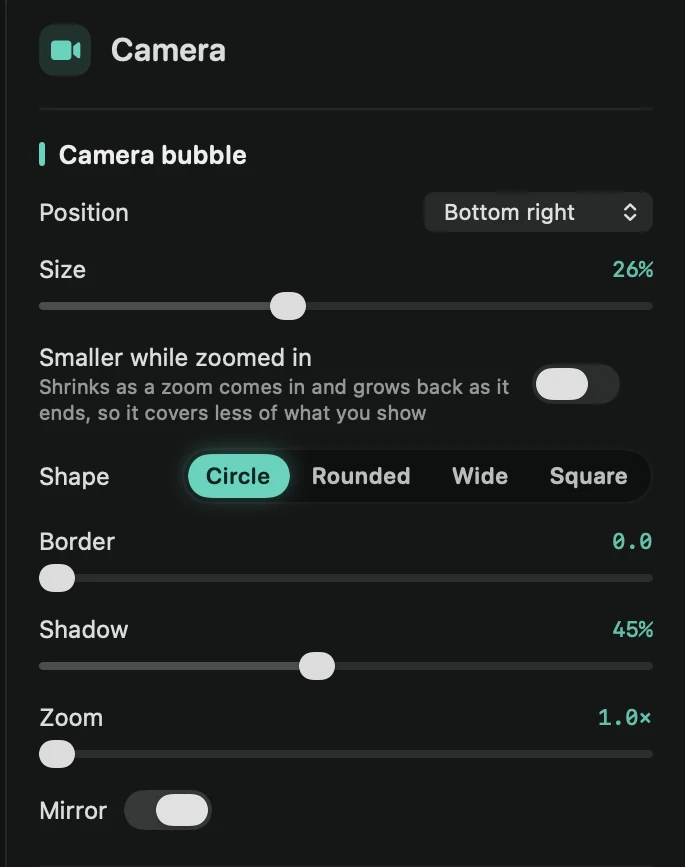
- Position: Bottom right, Bottom left, Top right, Top left, Bottom center or Top center.
- Size: how big the bubble is.
- Smaller while zoomed in: the bubble shrinks as a zoom comes in and grows back as it ends, so it covers less of what you show. Size while zoomed sets how small it gets. New recordings have this on.
Shape and style
- Shape: Circle, Rounded (a rounded square), Wide (a rounded rectangle) or Square. Rounded and Wide also have a Corner radius.
- Border: a ring around the bubble. Once it’s above 0, pick its Border color.
- Shadow: how strong the shadow under the bubble is.
- Zoom: moves in closer on you, up to 2.5×.
- Mirror: flips the picture, the way you see yourself in a mirror. It’s on at first.
Give it a look
Under Look, pick a color style: Natural, Warm, Cool, Vivid, Film, Mono or Studio. Intensity sets how strong it is, Sharpen makes the picture crisper, and Grain adds a little film grain.
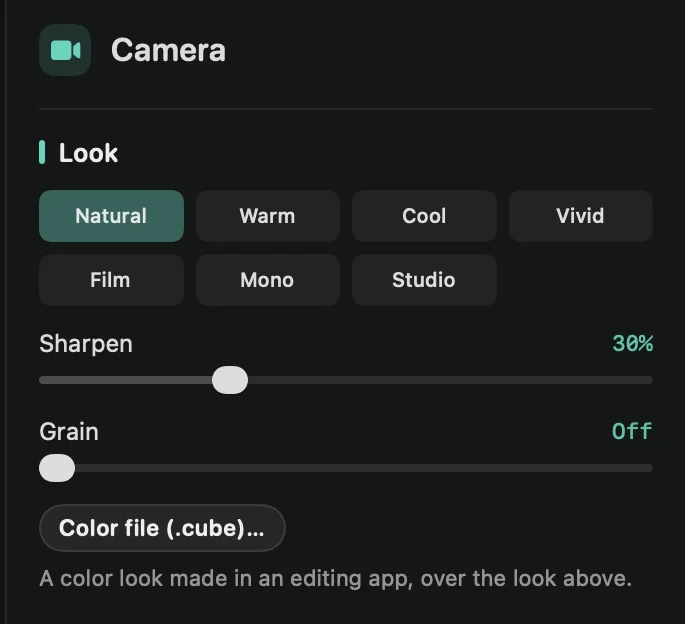
To use a color look made in a video editing app, click Color file (.cube)… and pick the .cube file. It goes over the look above, and Strength sets how strong it is. Framecast keeps a copy in the project. Change… picks another file, and ⓧ takes it off.
To show the camera full screen or next to your recording, see Camera layouts. To blur or change the room behind you, see Blur or change your background. Face tracking is in Smart camera.