GuideExport & share
Export a video
Save your video as an MP4, MOV or GIF. Pick the size, frame rate and quality, and see how long it will take before you start.
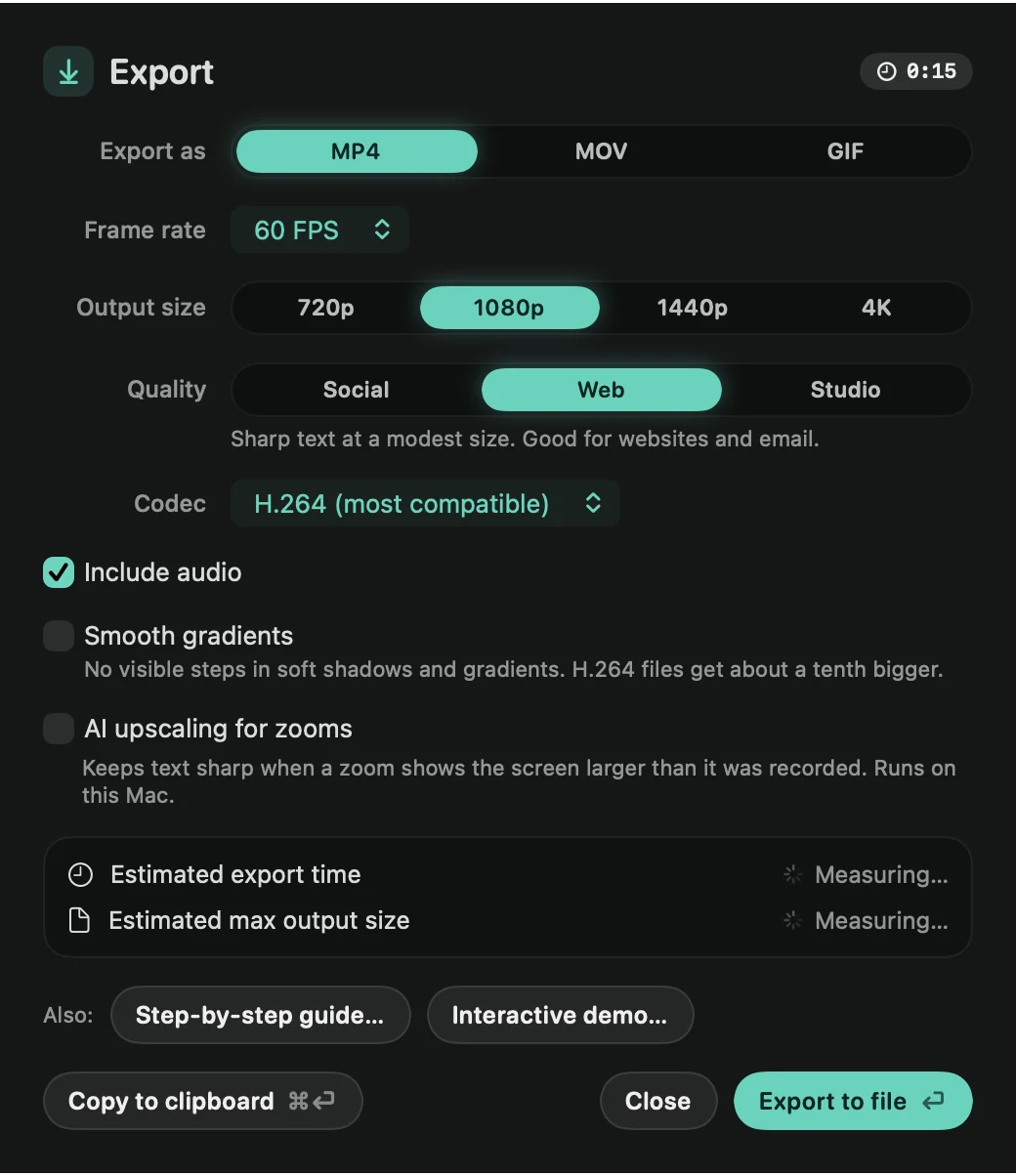
Export
- Click Export at the top right of the editor, or press ⌘E.
- Choose the format and settings.
- Click Export to file (or press ↩) and choose where to save. Framecast suggests your Desktop.
A progress bar shows how far along it is and about how long is left. Framecast’s icon in the Dock shows the progress too, so you can switch to another app while you wait. When it’s done, Framecast plays a sound and shows the file’s name with Show in Finder.
The settings
- Export as: MP4, MOV or GIF. A GIF has its own options; see Export a GIF.
- Frame rate: from 10 to 60 FPS. 60 keeps the cursor and zooms smooth.
- Output size: 720p, 1080p, 1440p or 4K. The exact size in pixels shows underneath.
- Quality: Social makes the smallest file, Web keeps text sharp at a modest size, and Studio gives the best picture and the biggest file. On a Mac with Apple silicon, H.264 keeps the same quality all through the video, so parts where little moves take very little space.
- Codec: H.264 (most compatible), HEVC (smaller) or ProRes 422 (editing). ProRes is always saved as a MOV.
- Include audio: untick it for a silent video.
- Smooth gradients: no visible steps in soft shadows and gradient backgrounds. H.264 files get about a tenth bigger.
- AI upscaling for zooms: keeps small text sharp when a zoom enlarges it. See AI upscaling.
Know before you export
Below the settings, Framecast shows the Estimated export time and the Estimated max output size. Both are measured on your Mac by exporting short parts of your video, and they update when you change a setting. For ProRes, the size is the most its settings allow.
The same window can also copy the video to the clipboard, or make a step-by-step guide or an interactive demo.
Note: exporting needs a license. Without one, Framecast shows Exporting needs a license when you try. See Your license.