GuideCaptions & transcript
Filler words and retakes
Take every “um” and “uh” out in one click, tighten long pauses, and cut the sentences you started over.
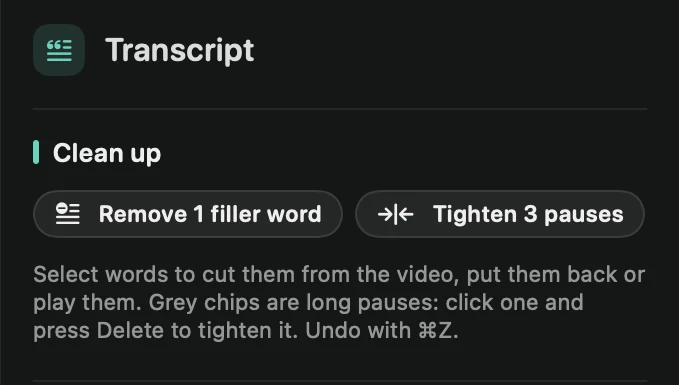
Remove filler words
Framecast marks filler words such as “um”, “uh”, “erm” and “hmm” in amber in the transcript. It also knows common fillers in German, French, Spanish, Italian, Portuguese and Dutch.
- Open the Transcript tab in the inspector on the right.
- Under Clean up, press the filler-words button. It shows how many Framecast found, for example Remove 3 filler words.
Each filler is cut with a little of the silence around it, never part of the next word.
Tighten pauses
The pauses button, for example Tighten 4 pauses, shortens every pause of 0.8 seconds or more. A quarter of a second stays on each side, so you still sound natural. To fix one pause at a time, click its grey chip in the text. See Edit with the transcript.
Cut retakes
When you start a sentence, stop, and say it again, Framecast notices that the new attempt begins with the same words. Clean up then lists them, for example “2 sentences were started over”, with each abandoned attempt struck through.
- Press Cut next to an attempt to remove it.
- With more than one, a button such as Cut all 2 retakes removes them all.
Read each one before you cut it: a sentence that starts like the one before isn’t always a mistake. To mark a bad take while you record, use Oops.
Tip: everything here is an ordinary cut. Press ⌘Z to undo it, or restore single words in the transcript. Remove filler words and Tighten pauses are also in the command menu (⌘K).